Best Scribe Alternatives for Step-by-Step Guides
Looking for the best Scribe alternatives? Compare the top tools for step-by-step guides, interactive SOPs, AI-searchable walkthroughs, and technical documentation.
Best Scribe Alternatives for Step-by-Step Guides
Scribe popularized automated process documentation by turning browser clicks into sequential screenshots with highlighted target markers. For simple internal workflows or repetitive administrative tasks, generating a quick visual guide in minutes represented a substantial leap forward from drafting manual documentation in Google Docs. However, technical delivery leads, digital agency operators, and software product managers frequently encounter severe operational friction when relying on Scribe for complex web applications, client deliveries, or dynamic user onboarding.
Handing off custom software, configured production dashboards, or multi-tenant SaaS environments requires more than a rigid sequence of cropped screenshots. When users receive a 45-step static guide, they rarely read it from start to finish. If an interface changes or if a user needs to troubleshoot a nuanced edge case two weeks after launch, scanning through dozens of disconnected static crops is frustrating and inefficient. Static guides trap institutional knowledge in fragile documents that rot the moment a software layout updates. Modern teams need interactive, searchable knowledge assets that stakeholders can actively query on demand.
Why Teams Outgrow Scribe for Step-by-Step Guides
While Scribe excels at capturing basic linear workflows, teams delivering sophisticated web products face four distinct operational bottlenecks that increase support overhead:
Screenshot sprawl and high maintenance burden: A modest three-minute software workflow can easily generate 30 to 50 individual screenshot steps in Scribe. When a development team updates a single navigation bar, renames a menu item, or alters a button color, every associated screenshot immediately becomes obsolete. Updating static guides requires tedious manual editing, cropping, and re-capturing, causing documentation libraries to suffer from rapid maintenance rot.
Rigid linear click paths miss operational context: Scribe operates strictly on discrete click events. It cannot capture the nuanced rationale behind a decision, real-time animations, conditional routing, or spoken architectural context. If an end user wants to know why a specific configuration toggle was selected rather than another, a static screenshot of a red click circle provides zero explanation.
Desktop recording and redaction locked behind high paywalls: Scribe restricts desktop application capture, screenshot redaction, and custom export styling to its costly Pro plans (starting at $23 to $29 per user per month). For development studios and agencies that need to mask sensitive client credentials or document cross-platform developer tools, these paywalls create immediate budget friction.
Passive reading creates repeat support requests: When non-technical clients or team members encounter an operational hurdle, they do not want to scroll through a 50-step document to locate a single setting. Lacking conversational search, users abandon lengthy static documents and schedule live support calls or send repeat tickets for questions already documented.
What to Look for in a Step-by-Step Documentation Tool
Before choosing an alternative platform, operations directors and product delivery leads should evaluate candidate software against four core operational criteria:
Dynamic Capture vs. Fragile Screenshot Overhead: The software should record live application workflows fluidly rather than fragmenting every click into a separate image file. This drastically cuts down maintenance hours when user interfaces undergo routine design updates.
Conversational AI Searchability: Recipients must be able to ask natural-language questions (e.g., "Where do I update the webhook secret?") and immediately receive direct instructions alongside visual markers, bypassing manual reading.
Permanent Canvas Redaction: To protect client privacy and staging security, the tool must provide permanent element-level masking at the video frame or image layer before publishing, preventing sensitive API tokens or personal data from leaking.
Zero-Friction Stakeholder Access: External clients, stakeholders, and internal teammates should be able to view, search, and interact with documentation without mandatory account creation or costly viewer seat licenses.
The 6 Best Scribe Alternatives for Step-by-Step Guides (Compared)
1. Demoly: Best for AI-Searchable Interactive Video Walkthroughs
Demoly is an interactive, AI-searchable walkthrough and documentation platform engineered specifically for tech agencies, software consultancies, and product teams. Instead of dissecting workflows into dozens of static screenshot crops that require constant maintenance, Demoly records continuous browser sessions while indexing both spoken explanations and visual DOM interactions. This turns screen recordings into interactive, self-serve knowledge hubs that answer user questions on demand.

Ask Demoly AI Search Drawer - Natural Language Semantic Video Search
Overview and Core Workflow
Demoly operates via a lightweight Chrome extension that captures browser tabs, audio narration, and on-screen interface actions. Following a recording, creators use an intuitive in-browser editor to make non-destructive cuts, trim awkward pauses, and split clips without needing external video editing suites. If a presenter accidentally shows staging credentials, API keys, or private customer records, Demoly provides permanent canvas element masking to redact sensitive data directly on the video frame before publication.
When viewers open a shared Demoly link, they do not need to watch a 15-minute video sequentially or scroll through 40 separate images. Instead, they type questions directly into the Ask Demoly AI search drawer. Demoly inspects both spoken narration and silent UI clicks, returning concise step-by-step instructions alongside clickable timestamp chips (▶ Jump to 00:06) that scrub the player directly to the exact action. Viewers and QA testers can also attach element-anchored comment pins (🎯 ) directly to specific interface components for contextual collaboration.
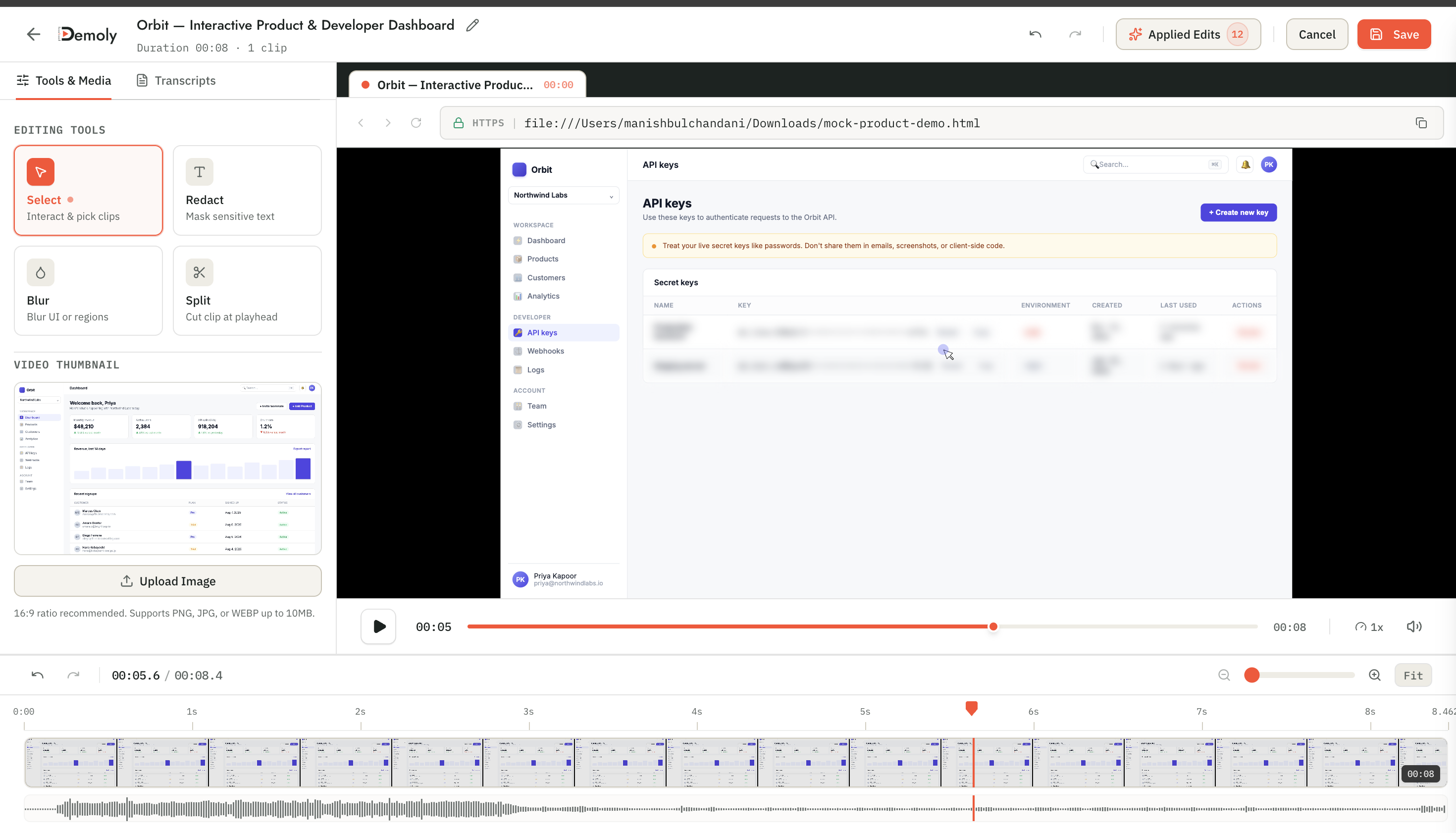
Demoly Visual Editor - Canvas Element Redaction and Blur
Where It Beats Scribe
Eliminates screenshot maintenance rot: Instead of maintaining dozens of individual cropped images that break when CSS updates, Demoly keeps full workflow fidelity in a single video asset that can be trimmed or updated in seconds.
Conversational natural-language search: Viewers ask plain-English questions in the AI drawer and jump straight to the exact visual timestamp, eliminating the need to read through 50 static steps.
Indexes silent interface actions: Scribe relies strictly on recorded click coordinates, while standard video tools index only audio transcripts. Demoly tracks the underlying browser Document Object Model, indexing silent clicks, form inputs, and tab switches even when the presenter never speaks aloud.
Built-in canvas privacy redaction: Permanent canvas masking allows teams to sanitize sensitive API keys and client data directly inside the editor without paying for enterprise add-ons.
Contextual element-pinned feedback: Stakeholders can pin comments directly to specific DOM elements at specific timestamps, streamlining post-delivery reviews and bug reports.
Where It Falls Short
Browser-workflow focus: Demoly is engineered specifically for browser-based web applications and SaaS platforms. It is not designed for recording native operating system software outside the browser.
Produces interactive video, not static print SOPs: Demoly delivers AI-searchable video walkthroughs. Teams requiring physical printed manuals or multi-page PDF documentation binders will need a static export tool.
Pricing and Seat Structure
Free Plan ($0/month forever): Unlimited recordings, 15-minute recording duration cap, 5 AI-enabled recordings per month, unlimited AI Q&A queries on enabled recordings, and unlimited free external viewers.
Pro Plan ($8/creator/month): Unlimited recordings, 30-minute recording duration cap, unlimited AI-enabled recordings, unlimited conversational AI search, and unlimited free external viewer seats.
[Seat Model Note]: Teams only pay for internal creators. External clients and stakeholders view, search, and comment on walkthroughs for free without creating accounts or paying seat fees.
2. Tango: Best for In-App Interactive Process Guidance
Tango is a process documentation and workflow capture tool that automatically generates step-by-step guides from browser and desktop activity. It is widely recognized for its "Guide Me" interactive extension, which transforms static documentation into interactive, in-app walkthrough overlays that guide users through live software step by step.
Overview and Core Workflow
Tango records user interactions in the background while users navigate through software interfaces. Upon completing a workflow, Tango automatically compiles a structured guide featuring cropped screenshots, highlighted click targets, and automatically drafted instructional copy. Creators can edit text annotations, blur sensitive interface fields, and organize guides into shared team workspaces.
What sets Tango apart from traditional documentation tools is its "Guide Me" viewer experience. Rather than reading a standalone guide in a separate browser tab, end users can launch the Tango browser extension to receive interactive step-by-step guidance directly inside the active web application. Highlighted target boxes hover directly over the actual interface elements, prompting the user where to click next until the process is completed.
Where It Performs Well
Interactive "Guide Me" live walkthroughs: Directs users through tasks within their active software interface via interactive on-screen prompts, bridging the gap between passive reading and active execution.
Cross-platform desktop capture: Tango Pro supports capturing native desktop applications across macOS and Windows, making it versatile for multi-software enterprise procedures.
Automated screenshot zooming: Automatically frames and zooms in on active interface buttons and input fields to ensure clear visual guidance.
Where It Falls Short for Technical Documentation
Requires viewer extension for interactive mode: The "Guide Me" feature requires end users to install the Tango browser extension, creating adoption friction for external clients or security-conscious enterprise teams.
Lacks spoken nuance and video context: Cannot capture fluid conversational dialogue, audio explanations, or complex architectural reasoning that technical handovers require.
High Pro tier pricing: Advanced desktop capture, custom branding, and team workspace management require paid plans starting at $16 to $20 per user per month.
Pricing and Seat Structure
Starter Plan ($0): Up to 25 workflows, web-only browser capture, standard sharing links.
Pro Plan ($16/user/month billed annually, or ~$20 billed monthly): Unlimited workflows, desktop application recording, custom branding, and PDF exports. (Note: Competitor pricing is subject to vendor updates.)
Enterprise Plan (Custom pricing): SOC 2 Type II compliance, advanced user permissions, dedicated customer success manager.
3. Guidde: Best for AI-Generated Video Guides with Synthetic Voiceover
Guidde is an AI-powered documentation platform that bridges the gap between static step-by-step screenshot guides and full-motion video. It records user workflows and automatically converts them into narrated, chaptered instructional videos using synthetic voiceover technology.
Overview and Core Workflow
When recording with Guidde, the tool monitors screen interactions, mouse movements, and application state changes. Once the recording finishes, Guidde's generative AI engine analyzes the workflow, generates written instructional descriptions for each step, and synthesizes a professional voiceover in the creator's choice of language and accent.
Guidde automatically applies dynamic camera pans, auto-zooms to active buttons, and formats the output into a modern, chaptered video player. Creators can adjust the auto-generated script, swap out voiceover avatars, or edit individual screenshot slides without needing to re-record the audio or screen capture from scratch.
Where It Performs Well
Automated synthetic voiceover: Automatically converts recorded clicks into polished spoken narration across over 100 languages, saving creators from recording manual voiceovers.
Slide-based video editing: Allows creators to replace a single outdated step or edit narrative text without re-recording the entire demonstration.
Automated zoom and focus effects: Dynamically zooms in on active form fields and interface elements, keeping viewers visually focused on relevant controls.
Where It Falls Short for Step-by-Step Documentation
Synthetic voice can feel impersonal: AI voiceovers, while grammatically clean, can lack the natural cadence, personality, and spontaneous technical insight of a live team engineer.
Rigid linear video consumption: While Guidde divides recordings into chapters, viewers cannot perform freeform conversational queries across visual states to troubleshoot unscripted edge cases.
Branded watermarks on free tiers: Free plans include Guidde watermarks and restrict advanced video export options to paid commercial tiers.
Pricing and Seat Structure
Free Plan ($0): Up to 25 how-to video guides, basic AI voiceover options, standard resolution.
Pro Plan (~$16/creator/month billed annually, or ~$20 billed monthly): Unlimited video guides, 100+ synthetic voiceover options, brand kit customization, and high-definition MP4 exports. (Note: Competitor pricing is subject to vendor updates.)
Business / Enterprise Plans (~$35+/user/month): Advanced team analytics, automated audio translations, single sign-on (SSO), and LMS integrations.
4. Supademo: Best for Interactive Clickable Product Demos
Supademo is an interactive product demo platform designed to create simulated, self-guided click-through tours. While Scribe creates static documents and Demoly creates searchable video walkthroughs, Supademo builds interactive sandbox simulations where prospective buyers or onboarding users click through simulated web screens.
Overview and Core Workflow
Supademo captures a series of browser screenshots and HTML DOM snapshots as a user navigates a web product. The creator then configures interactive hotspots, explanatory modal tooltips, and branching logic (such as letting viewers choose between admin and user onboarding tracks).
Viewers interact with the demo by clicking highlighted hotspots to advance through the interface at their own pace. Supademo also includes built-in lead capture forms, custom domain embedding, and viewer engagement analytics, making it a favorite among SaaS sales and product marketing teams.
Where It Performs Well
Hands-on interactive sandboxes: Lets prospects and onboarding clients experience software hands-on by clicking actual interface targets rather than passively watching a video.
Branching interactive pathways: Enables creators to build multi-track product tours tailored to different user roles or technical skill levels.
Top-of-funnel lead generation: Integrates lead capture forms directly into the demo flow to gate advanced walkthrough sections and capture qualified leads.
Where It Falls Short for Technical Documentation
High authoring and maintenance overhead: Building realistic branching simulations requires extensive upfront setup. If the underlying product UI changes, hotspots must be manually realigned.
Unsuited for open-ended troubleshooting: If a client has an operational question not mapped to an active hotspot, the interactive demo cannot answer it.
Costly creator seat model: Paid tiers start higher than conventional documentation tools, with Pro plans running between $27 and $36 per creator per month.
Pricing and Seat Structure
Free Plan ($0): Up to 5 interactive demos, basic analytics, standard Supademo branding.
Pro Plan ($27 to $36/creator/month billed annually/monthly): Unlimited interactive demos, custom domain hosting, lead capture gates, and video/GIF exports. (Note: Competitor pricing is subject to vendor updates.)
Scale Plan (~$45+/creator/month): Multi-demo showcases, collaborative team workspaces, and custom CSS styling.
5. Iorad: Best for Interactive Embedded Tutorials and Multi-Mode Learning
Iorad is an established tutorial creation platform built for corporate learning and development (L&D), customer training, and educational institutions. It records web and desktop workflows to create interactive tutorials that offer four distinct learning modes in a single capture.
Overview and Core Workflow
Creators capture an application workflow using Iorad's desktop software or browser extension. Iorad monitors user clicks and text inputs, capturing screenshots and formulating instructional steps automatically.
Once captured, Iorad processes the session into four distinct playback formats: "Try It" (an interactive simulation where users click through the workflow), "View It" (a continuous video/animation of the process), "Practice It" (an interactive sandbox with guided hints), and "Take Quiz" (an assessment mode testing the user's comprehension). Tutorials integrate directly with LMS platforms, Zendesk, Salesforce, and enterprise knowledge bases.
Where It Performs Well
Four simultaneous learning modes: Generates viewable, interactive, practice, and testing formats from a single recording session without manual re-authoring.
Deep LMS and enterprise integrations: Exports directly to SCORM packages, Zendesk Knowledge Bases, and popular enterprise learning management systems.
Automated audio voiceover: Includes automated speech synthesis to narrate instructional steps across multiple languages.
Where It Falls Short for Fast-Moving Teams
Steep enterprise pricing curve: Iorad's pricing is structured primarily for corporate training departments, with team and enterprise plans starting at $100 to $200+ per month, making it prohibitively expensive for small development shops.
Dated viewer interface: While functionally robust, the player interface and tutorial styling feel utilitarian compared to modern, minimalist alternatives.
Rigid authoring structure: Editing and re-sequencing complex multi-step workflows can feel cumbersome compared to lightweight modern tools.
Pricing and Seat Structure
Personal Plan ($0): Free for public web tutorials, basic sharing options, Iorad branding.
Pro / Business Plans ($100 to $200+/month for teams): Private tutorials, desktop capture, custom branding, SCORM exports, and enterprise LMS integrations. (Note: Competitor pricing is subject to vendor updates.)
6. Scribe: Best for Rapid Auto-Generated Static Screenshot SOPs
Scribe remains the category-defining tool for automatically turning browser clicks into sequential, screenshot-based standard operating procedures (SOPs).
Overview and Core Workflow
Scribe runs quietly in the background as a browser extension or desktop application. As the user completes a task, Scribe detects click coordinates, takes automatic screenshot crops, and overlays bright visual click target circles. When the user clicks complete, Scribe compiles the data into a clean, numbered markdown-style document.
Creators can reorder steps, edit written text instructions, combine multiple Scribes into larger "Pages" or knowledge bases, and share the output via direct web links or PDF exports. For standard operating procedures that follow a strictly linear sequence, Scribe offers one of the fastest authoring experiences on the market.
Where It Performs Well
Zero-effort static authoring: Generates comprehensive written guides in seconds without requiring manual screenshot taking or formatting.
Clean visual target indicators: Automatically highlights exact click locations with high-contrast target circles.
Flexible document embedding: Embeds seamlessly into Notion, Confluence, SharePoint, and company wikis.
Where It Falls Short for Dynamic Software Delivery
Severe screenshot maintenance rot: Any minor user interface redesign invalidates dozens of cropped images, demanding substantial maintenance overhead.
Expensive desktop recording tiers: Recording desktop applications or utilizing automated screenshot redaction requires upgrading to Pro plans starting at $23 to $29 per user per month.
No conversational AI troubleshooting: Stakeholders facing nuanced questions must manually scan through dozens of static steps, frequently giving up and requesting live support calls.
Pricing and Seat Structure
Basic Plan ($0): Web browser extension recording only, unlimited web guides, standard Scribe branding.
Pro Personal Plan ($23/user/month billed annually, or ~$29 billed monthly): Desktop application recording, automated screenshot redaction, custom branding, and export to PDF/HTML/Markdown. (Note: Competitor pricing is subject to vendor updates.)
Pro Team Plan ($12 to $15/user/month, minimum 5 seats): Shared team workspaces, collaborative document editing, and centralized billing.
Feature and Use-Case Comparison Matrix
The following matrix compares Demoly and the top five Scribe alternatives across primary use case, capture technology, searchability, privacy controls, stakeholder access, and starting price:
Platform | Primary Use Case | Capture Technology | Search & Discovery | Redaction & Privacy | Free Stakeholder Access | Starting Price |
|---|---|---|---|---|---|---|
Demoly | AI-searchable browser walkthroughs & handovers | Continuous video + DOM interaction events | Conversational AI (Visual + Spoken) | Permanent canvas element masking | Yes (Unlimited, zero-login) | Free ($0) / Pro: $8/mo |
Tango | In-app interactive process guidance & SOPs | Sequential screenshots + click tracking | Keyword text search + "Guide Me" overlay | Screenshot blur tools (Pro) | Yes (Requires extension for Guide Me) | Free ($0) / Pro: $16/mo |
Guidde | AI video guides with synthetic narration | Screen capture + automated AI script synthesis | Chaptered video timeline navigation | Sensitive field blur overlays | Yes (Direct web links) | Free ($0) / Pro: $16/mo |
Supademo | Interactive clickable demo tours & sandboxes | HTML DOM snapshots + interactive hotspots | Sequential hotspot navigation | Synthetic element masking | Yes (Public web embeds) | Free ($0) / Pro: $27/mo |
Iorad | Multi-mode corporate training & LMS tutorials | Screen events + screenshot capture | Step-by-step interactive mode selector | Basic image masking (Paid) | Yes (Public tutorials only) | Free ($0) / Teams: $100+/mo |
Scribe | Auto-generated static screenshot SOPs | Sequential screenshots + click coordinates | Keyword text search across documents | Smart screenshot redaction (Pro) | Yes (Direct web links) | Free ($0) / Pro: $23/mo |
Which Scribe Alternative Should Your Team Choose?
Selecting the ideal Scribe alternative depends on the format your audience prefers and the operational overhead your team is willing to maintain:
For in-app interactive execution that walks users through live software directly on their screen, select Tango. If you are evaluating process documentation platforms in depth, explore our comparative analysis of the Best Tango Alternatives for Process Documentation.
For automated synthetic video narration that turns screen recordings into polished voiceover how-to guides without recording your own voice, deploy Guidde.
For clickable sandbox demos that allow prospective buyers or new users to test software features interactively on marketing landing pages, choose Supademo.
For structured enterprise training that demands SCORM exports and quiz assessments across LMS platforms, invest in Iorad.
For rapid browser walkthroughs and technical handovers where you want to eliminate screenshot maintenance and let stakeholders query recordings via conversational AI, choose Demoly.
Modern asynchronous documentation platforms allow technical teams to move beyond brittle, static screenshot manuals. By deploying tools that index both visual DOM actions and spoken narration, your team can turn complex software deliveries into self-serve knowledge assets that clients can query independently. To see how visual indexing changes workflow discoverability, read our technical breakdown on DOM capture vs pixel capture: why it changes what a video can answer, or follow our step-by-step playbook on how to record a web app walkthrough your client can actually search.
You can evaluate Demoly with your team on the free forever plan ($0, unlimited recordings) at demoly.dev.
Frequently asked questions
Commonly asked questions about this article.
01•Why do teams look for alternatives to Scribe for process documentation?
Teams replace Scribe when managing 40+ static screenshots per guide creates severe maintenance rot whenever software updates, or when clients abandon lengthy documents to request live support meetings.
02•How does Demoly prevent the documentation maintenance overhead of Scribe?
Demoly records fluid video walkthroughs alongside browser DOM events rather than static screenshots, allowing teams to trim pauses or update sections in minutes without re-capturing dozens of images.
03•Can Demoly locate instructions in a walkthrough if the presenter did not speak?
Yes. Demoly indexes underlying browser DOM clicks, input fields, and tab transitions alongside spoken audio, allowing viewers to locate silent visual actions via conversational AI search.
04•Do clients need paid seats or browser plugins to search Demoly walkthroughs?
No. Demoly links open in any modern browser, granting external clients and stakeholders full playback and conversational AI search access without account logins, plugins, or viewer seat fees.
05•Does Scribe support desktop application recording on its free tier?
No. Scribe restricts desktop application capture and automated sensitive data redaction to its Pro plans, which start at $23 to $29 per user per month.
Demoly Team
Contributor
Related Dispatches
View all dispatches →
Best Screen Studio Alternatives for Windows and Linux
Looking for Screen Studio alternatives on Windows or Linux? Compare top cross-platform tools for auto-zoom effects, AI-searchable walkthroughs, and screen recording.
Best Arcade Alternatives for Product Walkthroughs
Looking for an Arcade alternative for product walkthroughs? Compare the top tools for interactive demos, AI-searchable video walkthroughs, and client handovers.
Best Guidde Alternatives for Video Documentation
Looking for a Guidde alternative for video documentation? Compare top tools for AI walkthroughs, searchable guides, written SOPs, and client handovers.
Try Demoly for your team
Create branchable, interactive demo recordings and deliverables in minutes with zero friction.