DOM Capture vs Pixel Capture: Why It Changes What a Video Can Answer
Understand the technical difference between DOM capture and pixel capture. Learn why preserving web structure enables true AI search, copyable text, and silent action indexing.

DOM Capture vs Pixel Capture: Why It Changes What a Video Can Answer
A standard screen recording shows what happened on a display, but what a system understands about that recording depends on how the data was captured. When a recorder captures flat pixels, it creates a visual timeline that humans can watch, yet leaves the underlying software structure invisible. When a system captures Document Object Model (DOM) data alongside visual frames, it preserves the interactive hierarchy of the application itself. This difference determines whether you can search silent actions, locate specific interface states, extract text, or enable AI tools to answer questions about what occurred on screen.
What Is Pixel Capture?
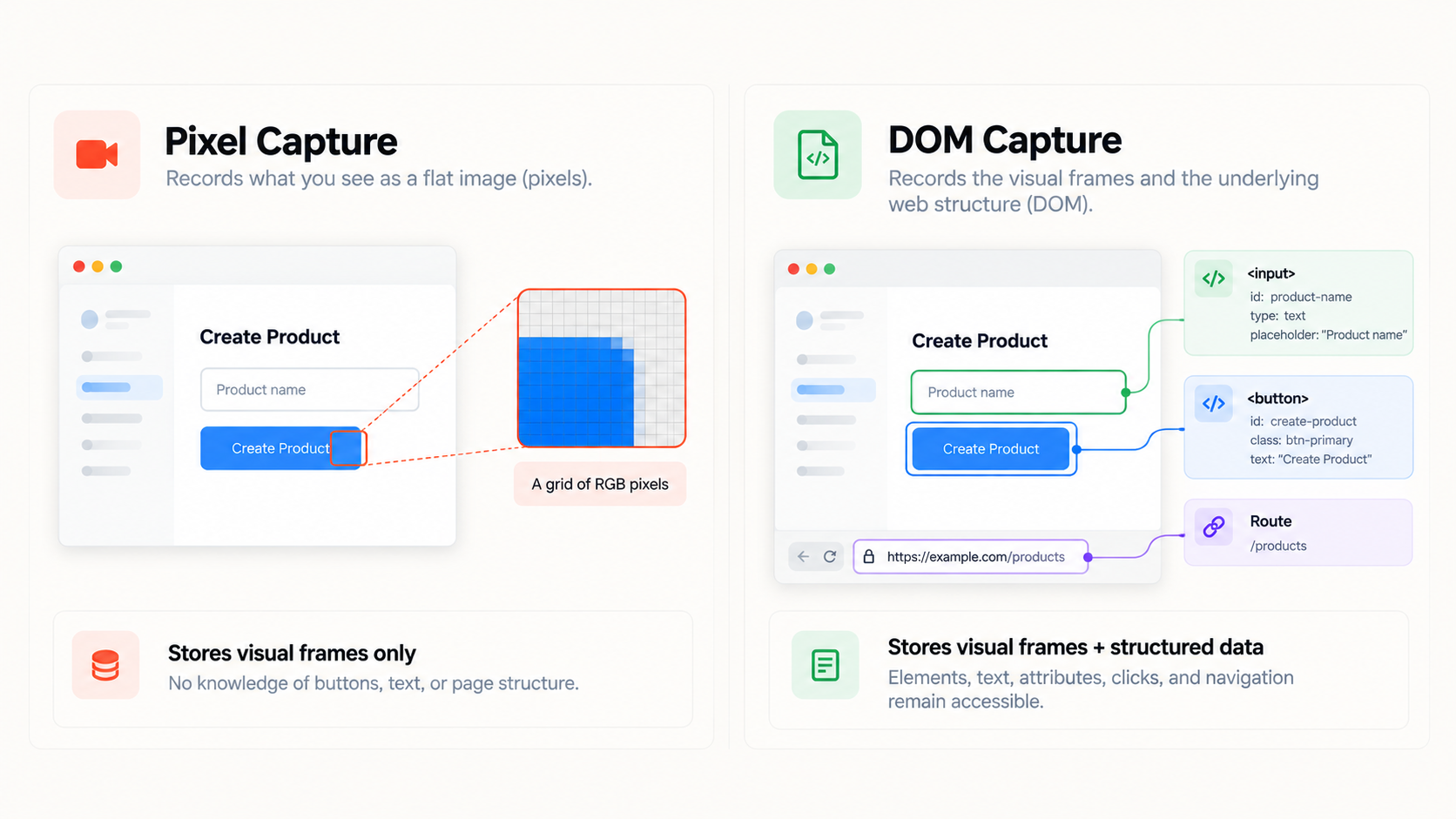
Pixel capture records the screen as a sequence of raster images compressed into a standard video container like an MP4 or WebM stream. The recorder takes repeated snapshots of the display buffer at a fixed frame rate, encoding color values for coordinates across time.
In a pixel-only recording, the file contains no native software context. The video does not know that a blue rectangle is a submit button, that a string of characters is an error code, or that the user navigated to a new URL. Every visual change is simply a cluster of changing color values.
Because the system only stores pixels, deeper understanding must be inferred later. Finding text requires an optical character recognition (OCR) engine to scan visual frames. Finding user actions requires an AI model or human viewer to watch the footage or inspect an audio transcript. The recording itself holds no direct, structured knowledge of the underlying application.
What Is DOM Capture?
DOM capture preserves the software elements of a webpage alongside the recording. The Document Object Model (DOM) is the tree structure browsers use to represent and render content. It defines every HTML element, text node, input field, and attribute on the page.
When a capture system is DOM-aware, it records this interface hierarchy as structured data:
HTML tags such as `` or ``
Element attributes, IDs, class names, and data selectors
Text nodes nested inside components
State changes, focus shifts, and route transitions
Exact click, hover, and keyboard event sequences
The system does not need to guess what happened by analyzing shapes. It receives structured events directly from the browser, pairing a machine-readable map of the interface with the visual timeline.
DOM Capture vs Pixel Capture: Core Comparison
The difference between these capture methods is the presence or absence of underlying structural context:
Technical Criterion | Pixel Capture | DOM Capture |
|---|---|---|
Primary Data Captured | Rasterized visual frames (color coordinates over time) | Visual frames synchronized with a structured DOM event log |
Visual Appearance | Full visual fidelity across any application window | Full visual fidelity within supported browser environments |
Structured Page Data | None; semantic hierarchy is flattened during rendering | Preserved; elements, attributes, and tags remain inspectable |
Text Extraction | Requires compute-heavy OCR; prone to resolution artifacts | Direct extraction from semantic text nodes without OCR errors |
UI Element Context | None; buttons and inputs are merely colored shapes | Explicit; system knows the exact component, ID, and tag |
Silent User Interactions | Unrecorded unless spoken aloud or spotted visually | Tracked via timestamped click, input, and navigation events |
Search Intelligence | Limited to audio transcripts or visual OCR passes | Direct querying of visual actions, text nodes, and UI states |
Environment Scope | Universal; records web browsers, desktop apps, and OS screens | Web-native; requires a browser context or browser extension |
Why the Difference Matters for Video Search
Search systems can only retrieve data that has been indexed. In a pixel-only recording, video search generally relies on an audio transcript. If a creator performs a complex configuration workflow without narrating every click, those actions remain invisible to search. A transcript-based search engine returns zero results for silent navigation because no audio was recorded.
When DOM data is captured, the system logs the actual UI event. It registers that an element labeled "Manage Webhooks" was clicked at `01:42`, even if the creator said nothing. When someone queries the recording for that step, the search system does not need to guess from audio. It matches the query against the indexed event log and jumps directly to the exact frame.
What This Changes for AI-Searchable Video
Capturing DOM data does not automatically make a video intelligent. Effective search still requires an end-to-end pipeline: capture, understand, index, search, and retrieve. However, the structure of the underlying data dictates how accurately an AI system can retrieve answers.
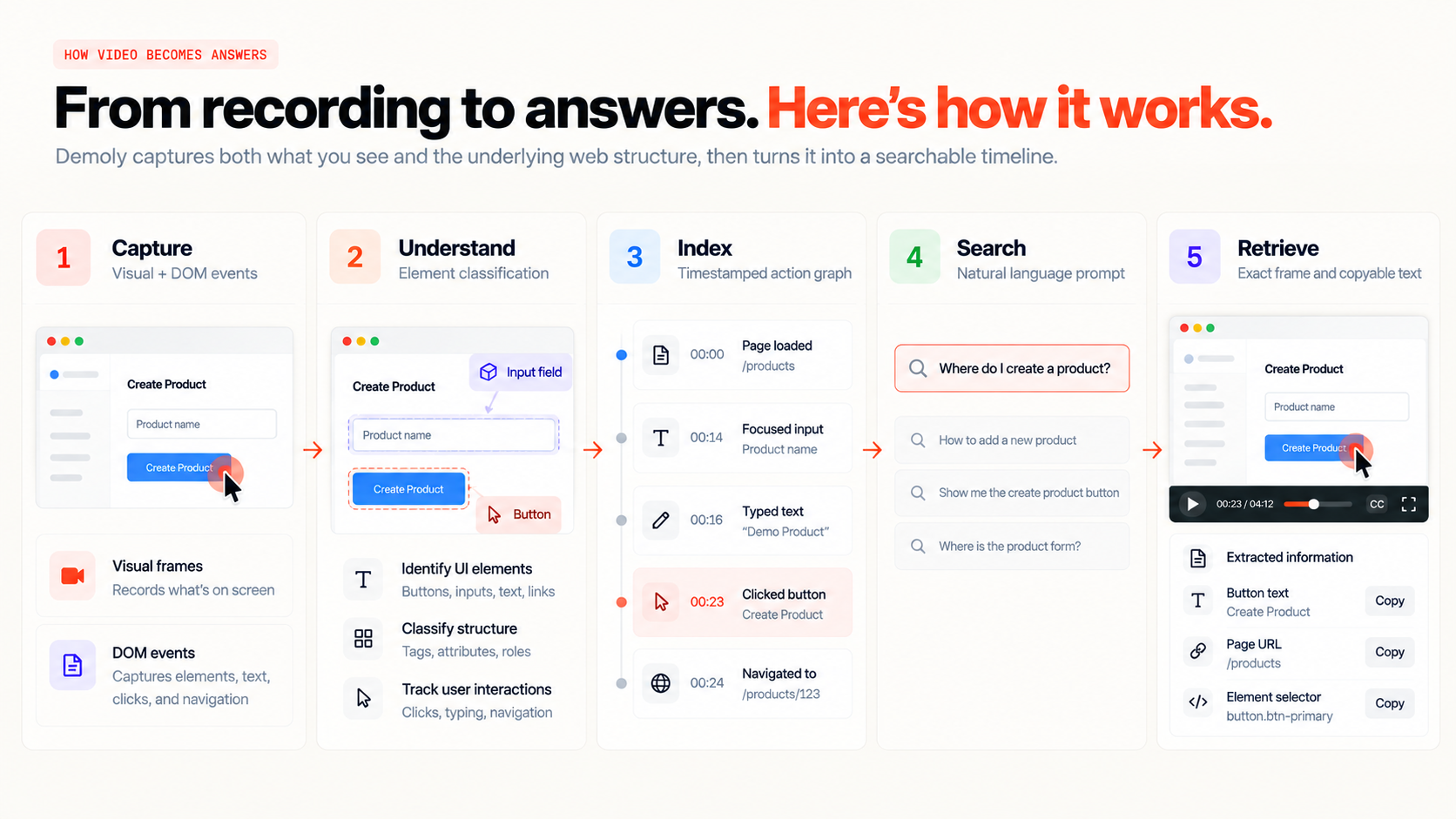
When an AI system processes a pixel-only recording, it relies on computer vision models to segment frames and OCR to read text. This process is compute-intensive, sensitive to screen scaling, and blind to off-screen elements or route changes.
With DOM metadata, the model works with explicit data:
Deterministic Element Identification: The system identifies that a button with `id="submit-payment"` was clicked, rather than estimating that a cursor hovered near a colored box.
Context-Rich Action Linking: Because DOM events carry timestamps, the system connects actions directly to video frames so viewers can jump to the exact second.
Interactive Text Layers: Because text exists as structured string data rather than flattened graphics, viewers can select and copy code snippets or error logs directly from a paused frame.
A Simple Example: The Silent Checkout Flow
Consider an agency developer recording a walkthrough of an updated billing dashboard for a client.
The developer clicks through Settings, opens the Billing tab, and toggles the subscription from Monthly to Annual. Because they are moving quickly, they complete this sequence silently.
Later, the client asks: "Where did we change the billing cycle to annual?"
With Pixel Capture: The search tool checks the audio transcript. Because nothing was spoken, no match exists. The client must manually scrub through the recording to spot the toggle.
With DOM Capture: The system recorded the click on the toggle element, its label ("Annual Billing"), and its route transition. The search tool identifies the event and jumps straight to the exact second it happened.
Where Each Approach Makes Sense
Neither approach is universally superior. They serve different needs across different environments.
When Pixel Capture Is Necessary
Pixel capture remains the practical standard for broad operating-system recording:
Desktop OS Demonstrations: Recording native desktop applications like terminals, local IDEs, or system settings cannot rely on web DOM trees.
Low-Overhead Universal Streaming: Capturing a standard display buffer requires no integration with an application's internal document hierarchy.
Pure Visual Output: Polished marketing clips focused primarily on smooth cursor paths and camera pans only need clean pixel rendering.
When DOM Capture Provides Distinct Value
DOM capture is best suited for web applications where users need to retrieve specific information later:
Client Project Handovers: Delivering web projects where non-technical stakeholders need answers to operational questions without scrubbing timelines.
QA and Bug Reporting: Logging web application issues where engineers need the exact DOM selector, form input, or component state that triggered a defect.
Searchable Internal Documentation: Building reusable SaaS walkthrough libraries that remain quick to search as reference material.
How Demoly Fits In
Demoly uses a dual-layer approach designed for browser workflows. Rather than choosing between visual playback and semantic context, it records visual browser video while simultaneously indexing DOM actions, route transitions, and UI elements.
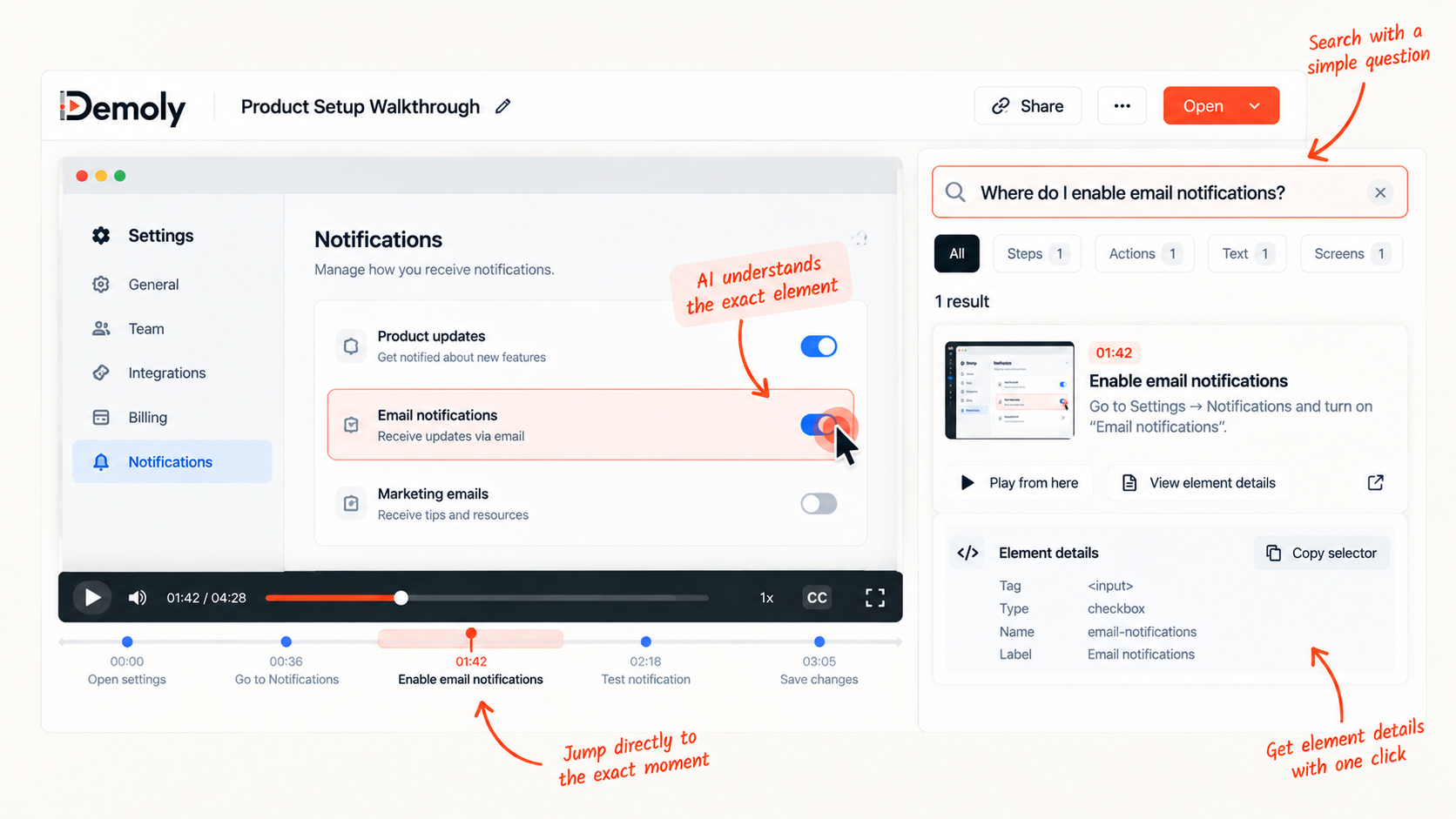
This architecture supports several workflow-specific capabilities:
Visual & Voice AI: Demoly indexes spoken narration alongside on-screen activity. If you update a setting or switch tabs silently, that moment remains searchable.
Element-Anchored Comments: Feedback attaches directly to specific DOM elements on the page rather than static pixel coordinates that break when screens resize.
Interactive Frame Extraction: Viewers can select and copy code, logs, and error strings directly out of recorded frames.
Permanent Canvas Redaction: Sensitive customer data or credentials can be permanently expunged from video frames before publishing, rather than hidden behind superficial CSS blur overlays.
Capturing structural web context alongside video frames turns screen recordings into searchable reference assets instead of passive video files.
Frequently asked questions
Commonly asked questions about this article.
01•What is the primary difference between DOM capture and screen recording?
Standard screen recording captures flat visual pixels over time, while DOM capture records the structured HTML elements, text nodes, and UI interactions of a webpage alongside visual frames.
02•Can pixel-based video still be searched?
Yes, but pixel search is generally limited to spoken audio transcripts or visual OCR processing, both of which miss unvoiced actions and require significant compute power to detect text.
03•Does DOM capture record everything on a webpage?
No. DOM capture registers the document hierarchy, visible text, and tracked user events within the browser window. It does not automatically capture desktop OS events or background server processes without dedicated telemetry integrations.
04•Why does DOM capture matter for AI-searchable video?
It provides AI systems with clean, structured event data (element IDs, button labels, clicks, and routes) instead of forcing the model to guess user intent purely from visual shapes or spoken words.
05•Can DOM capture and pixel capture be used together?
Yes. Modern walkthrough tools pair visual pixel frames for human viewing with synchronized DOM event logs for machine searchability, text extraction, and precise navigation.

Team Demoly
Contributing author covering precision walkthroughs and modern product engineering at Demoly.
Related Dispatches
View all dispatches →
Loom vs Vidyard: Which Is Better for Tech Agencies?
Compare Loom and Vidyard for tech agencies. Discover how screen capture, CRM tracking, video analytics, and client handoff workflows compare in practice.
Supademo vs Demoly: Interactive Demos vs AI-Searchable Walkthroughs
Compare Supademo and Demoly to choose between synthetic click-through demo tours and AI-searchable browser video walkthroughs for client handoffs and product guides.

Best Loom Alternatives for Tech Agencies
Looking for Loom alternatives for your tech agency? Compare the 6 best tools for client handoffs, AI-searchable walkthroughs, QA bug reporting, and interactive documentation.
 Team Demoly
Try Demoly for your team
Create branchable, interactive demo recordings and deliverables in minutes with zero friction.