How Customer Success Managers Onboard Clients Asynchronously
Scheduling endless onboarding calls drains customer success teams and slows client activation. Learn how CSMs onboard new accounts asynchronously using modular, AI-searchable walkthroughs.
How Customer Success Managers Onboard Clients Asynchronously
A Customer Success Manager sends a Calendly link on Monday morning to kick off onboarding for a newly closed mid-market account. The client champion responds three days later, noting that their technical lead is travelling and their primary system administrator is booked until next Thursday. By the time all six client stakeholders finally join a live 45-minute onboarding call, three full weeks of the contract have already elapsed.
During the call, the CSM shares their screen, presents twenty slides, and races through user provisioning, permission groups, workflow automations, and reporting dashboards. The client team nods politely, asks two generic questions, and thanks the CSM for their time.
By Monday morning, the real operational breakdown begins.
The client administrator forgets how to configure custom webhook triggers. Hesitant to look unprepared, they put off the setup for another week. When team members finally attempt to invite colleagues, they run into permission errors and submit urgent support tickets. The CSM context-switches out of strategic account reviews to jump on another ad-hoc troubleshooting call, re-explaining the exact configuration steps covered during the original webinar.
When a SaaS company scales from fifty to five hundred accounts, this synchronous onboarding cycle breaks down. Customer Success teams cannot hire a new CSM for every twenty accounts just to repeat the same interface tours. Written help centers fail because clients rarely read 20-page manuals, while standard video recordings trap operational guidance on an unsearchable linear timeline.
Eliminating this bottleneck requires replacing scheduled walkthrough meetings with an asynchronous client onboarding standard built for immediate, self-serve execution.
The Asynchronous Client Onboarding Standard
High-performing customer success teams follow five practical rules when onboarding new accounts asynchronously:
- Modular Role Tracks Over Monolithic Webinars: Split product onboarding into discrete three-to-five-minute modules organized by operational job role rather than recording one continuous 45-minute tour.
- Runtime Browser Execution Over Abstract Documentation: Show actual clicks, form fields, and system states inside the real web application instead of relying on static presentation slides or abstract documentation.
- Zero-Friction Access Without Seat Taxes: Distribute walkthrough links that client stakeholders can open instantly in any web browser without requiring viewer accounts or paid licenses.
- Semantic Natural-Language Search Over Scrubbing: Provide interactive video libraries where clients can ask operational questions and jump straight to timestamped answers.
- Permanent Canvas Redaction for Sandbox Privacy: Mask internal customer identifiers, staging API keys, and sensitive database records directly at the video canvas layer before distributing recordings.
Why Traditional Client Onboarding Calls Fail
Client onboarding delays rarely happen because a customer lacks enthusiasm for the software. They happen because customer success teams rely on communication formats that collapse under modern operational demands.
1. The Multi-Calendar Scheduling Chokehold
Coordinating schedules across busy executive sponsors, system administrators, and department leads routinely adds two to four weeks of dead time to the customer journey. Every day spent waiting for a mutual calendar opening is a day where the software delivers zero value. When time-to-value (TTV) drags out past thirty days, executive churn risk spikes dramatically before the client even finishes basic implementation.
2. Webinar Amnesia and Cognitive Overload
Synchronous screen-share calls create an illusion of learning. When a CSM demonstrates user permissions, field mappings, notification rules, and custom integrations across forty-five minutes, client attendees experience cognitive overload. Human working memory cannot retain complex software navigation sequences passively. Because nobody takes notes on exact interface clicks during a live meeting, client stakeholders forget the operational nuances the moment the video call ends.
3. The Unsearchable Video Graveyard
To avoid repeated live calls, many CSMs record their Zoom onboarding sessions and email the MP4 file or Google Drive link to the client. While well-intentioned, this creates an unsearchable video graveyard. When a departmental manager needs to remember how to route approval queues three weeks later, they will not scrub through a 45-minute video file guessing where that step was shown. Because standard video tools only index spoken audio, any configuration shown silently remains completely invisible to search. Frustrated, the manager submits a support ticket or demands another live meeting.
5 Steps to an Asynchronous Client Onboarding Engine
Customer success teams can replace repetitive kickoff webinars with a repeatable, self-serve onboarding engine by following five tactical steps:
1. Map the Onboarding Journey into Role-Based Tracks
Do not force every stakeholder to consume the same curriculum. Divide your onboarding modules into clean operational tracks mapped to distinct user responsibilities:
- Track 1: System Administrators & IT Leads: SSO integration, domain verification, role-based access control (RBAC), and security audit logging.
- Track 2: Team Leads & Workflow Owners: Pipeline creation, automation rules, team assignment logic, and dashboard reporting.
- Track 3: Day-to-Day Operators: Basic task completion, search filters, keyboard shortcuts, and profile notification preferences.
Organizing walkthroughs by role ensures that every team member receives only the exact guidance relevant to their daily workflow. For teams looking for the optimal software foundation, explore our detailed analysis of the Best Tool for Web App Onboarding Walkthroughs.
2. Record Focused 3-to-5 Minute Browser Workflow Modules
Resist the urge to record long walkthroughs. Keep each module strictly focused on completing a single operational outcome:
- Launch your browser capture tool and select the target web application tab.
- State the primary objective in sentence one (for example: "In this module, we will configure role permissions for department managers").
- Perform the exact workflow at a steady pace, clicking deliberately on interface elements.
- Highlight subtle system states, such as required toggle settings or confirmation badges that appear upon saving.
- Conclude the recording immediately once the task is complete.
Keeping videos under five minutes makes them easy to consume during brief gaps between meetings and allows CSMs to update individual steps later without re-recording entire curricula.
3. Mask Sensitive Tenant Credentials and Staging Data
When recording walkthroughs inside staging workspaces or test tenants, CSMs frequently expose internal company emails, temporary API keys, or placeholder customer records.
Before sharing walkthroughs with external client teams, sanitize the recording using canvas-level masking. Applying permanent blur overlays directly over sensitive form inputs, webhook URLs, and test billing numbers protects confidentiality across all client organizations.
4. Anchor Contextual Comments to Key Milestones
Elevate your onboarding videos from passive demonstrations to interactive guides by dropping element-anchored comment pins onto critical settings. If a specific checkbox in the administration panel must remain disabled to prevent duplicate email alerts, drop a comment pin directly on that toggle. When the client watches the walkthrough, the player highlights that specific component at the exact second it matters most.
5. Package Modules into a Zero-Friction Client Portal
Organize all role-based modules into a centralized, easily shareable project repository. Rather than sending individual links scattered across email threads or onboarding spreadsheets, deliver a unified workspace link.
Ensure the client portal requires zero viewer logins or software downloads. When client stakeholders can access onboarding videos instantly without creating another username and password, onboarding completion rates increase substantially. If your team wants to optimize this setup, review our tactical guide on How to Record a Web App Walkthrough Your Client Can Actually Search.
What Makes an Effective Asynchronous Onboarding Packet
A high-performing onboarding packet eliminates friction by structuring educational videos alongside actionable verification milestones. Instead of sending an unstructured list of video links, provide an organized implementation packet.
An effective asynchronous onboarding guide follows a structured four-part layout:
- Account Header & Milestones: Specifies the client organization name, assigned CSM, target go-live date, and primary account activation criteria.
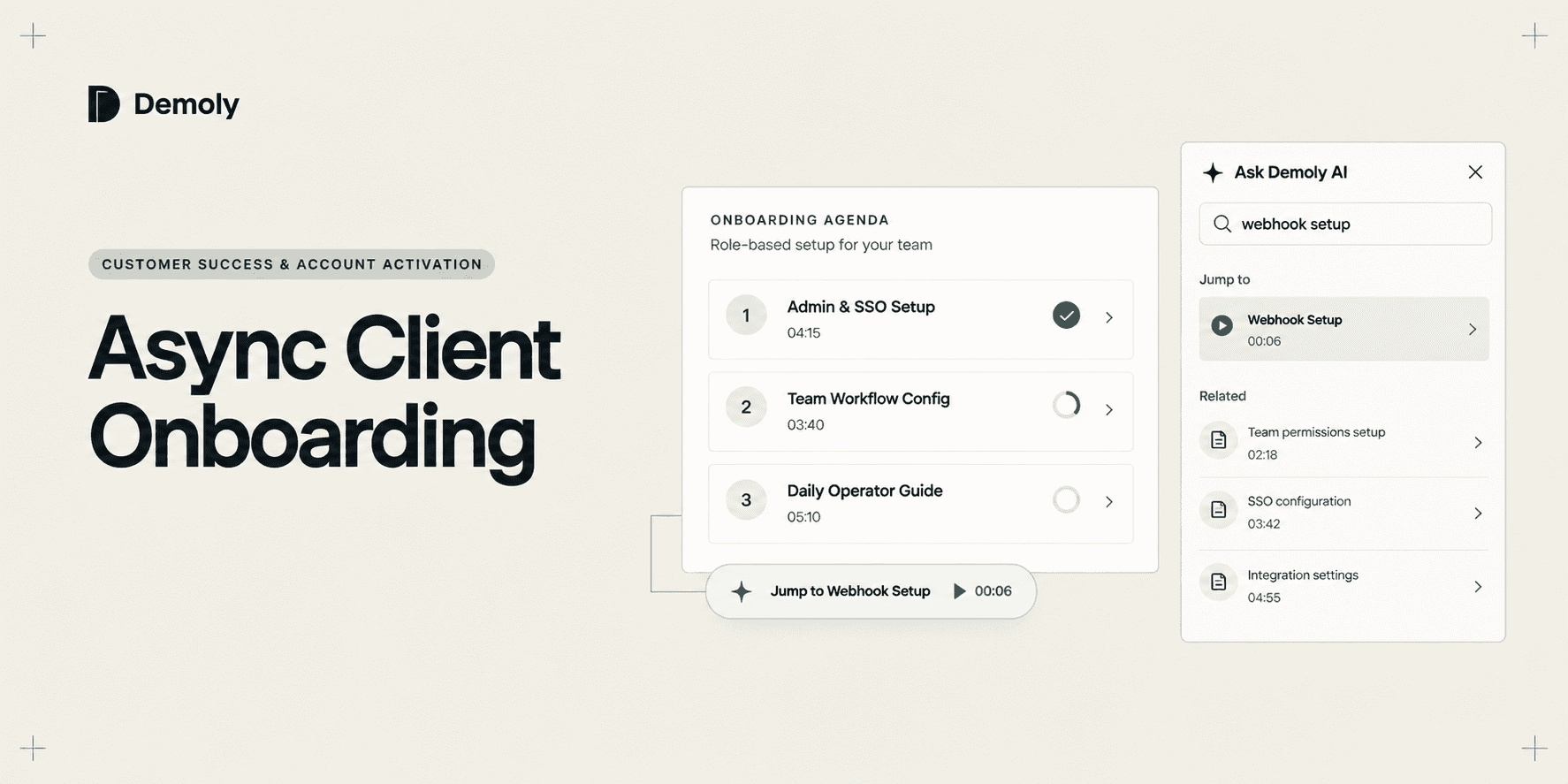
- Track 1: Admin & Security Configuration: Contains Module 01 (Workspace Setup & SSO, 04:15) and Module 02 (User Roles & Permissions, 03:40), paired with concrete checklist tasks such as verifying domain DNS and provisioning five initial admin seats.
- Track 2: Operational Team Setup: Contains Module 03 (Custom Pipelines & Automation, 05:10) and Module 04 (Analytics & Custom Reports, 04:05), paired with checklist milestones for creating initial team queues and connecting integration webhooks.
- Escalation & Async Q&A Channel: Clear guidance on where client leads can drop asynchronous comments, review AI-indexed video answers, or request specialized technical reviews.
This structure succeeds because every element addresses a specific point of onboarding friction:
- Predictable Time Investments: Stating the exact duration of each module reassures busy client administrators that reviewing a tutorial requires only four minutes rather than half an hour.
- Unambiguous Success Verification: Instead of asking clients if they feel comfortable with the tool, each module pairs with an objective milestone (such as verifying DNS records or creating a test pipeline).
- Self-Contained Organization: Grouping administrative tasks separately from everyday operator workflows prevents team members from wasting time on irrelevant configuration settings.
- Clear Async Escalation: Directing questions to video comment threads or asynchronous channels prevents ad-hoc meeting requests while maintaining responsive communication.
Comparing Documentation Formats for Client Onboarding
The media format customer success teams choose to deliver onboarding directly affects how quickly clients reach self-sufficiency.
Onboarding Format | Creation Speed | Maintenance Cost | Searchability & Discovery | Client Adoption Friction | Best Suited For |
|---|---|---|---|---|---|
Live Video Calls (Zoom / Meet) | Slow (45–60 min per client account) | Extremely High (must repeat for every new client) | None (calls vanish once ended) | High (calendar coordination delays) | Executive relationship building and high-level strategy |
Static Text Guides & Help Centers | Slow (requires screenshots and formatting) | High (drifts out of date when UI changes) | Medium (keyword-only text search) | High (clients skim or ignore long manuals) | Reference documentation and API specifications |
Standard Screen Recording (Loom) | Fast (record once in browser) | Medium (requires full re-recording if audio changes) | Low (speech transcript search only; no visual click search) | Medium (viewer seat limits and subscription fees) | Quick internal updates and one-off client bug fixes |
AI-Searchable Walkthroughs (Demoly) | Fast (modular browser tab capture) | Low (isolated clips updated in minutes) | High (natural language AI search indexes spoken audio and UI clicks) | Very Low (zero-login public links; no client seat fees) | Scalable client onboarding, product handovers, and self-serve training |
Live video calls consume dozens of CSM hours each week, yet they leave zero searchable documentation behind. Static text manuals take days to create and format, but busy clients rarely read them. Standard screen recording tools speed up initial recording, but they bury operational knowledge on linear timelines where silent interface clicks cannot be found.

Modern walkthrough platforms like Demoly transform screen recordings into interactive knowledge assets. By indexing spoken narration alongside on-screen UI clicks and DOM interactions, Demoly allows clients to query onboarding libraries conversationally. When a client admin asks, "Where do I find the webhook signing secret?", the AI drawer returns a concise text explanation alongside a direct timestamp link (WATCH AT 00:06), jumping straight to that exact setting in the video player.
Using Demoly for Asynchronous Client Onboarding
Customer success managers do not need to replace their existing tech stack to build an asynchronous onboarding engine. Your CRM, ticketing tools, and project management workspaces remain your operational foundation, while Demoly provides the visual walkthrough layer.
Using Demoly, CSMs can build, organize, and share self-serve onboarding curricula in four straightforward steps:
1. Record Focused Modules with the Chrome Extension
Initiate capture using the lightweight Demoly Chrome extension without leaving your web application.
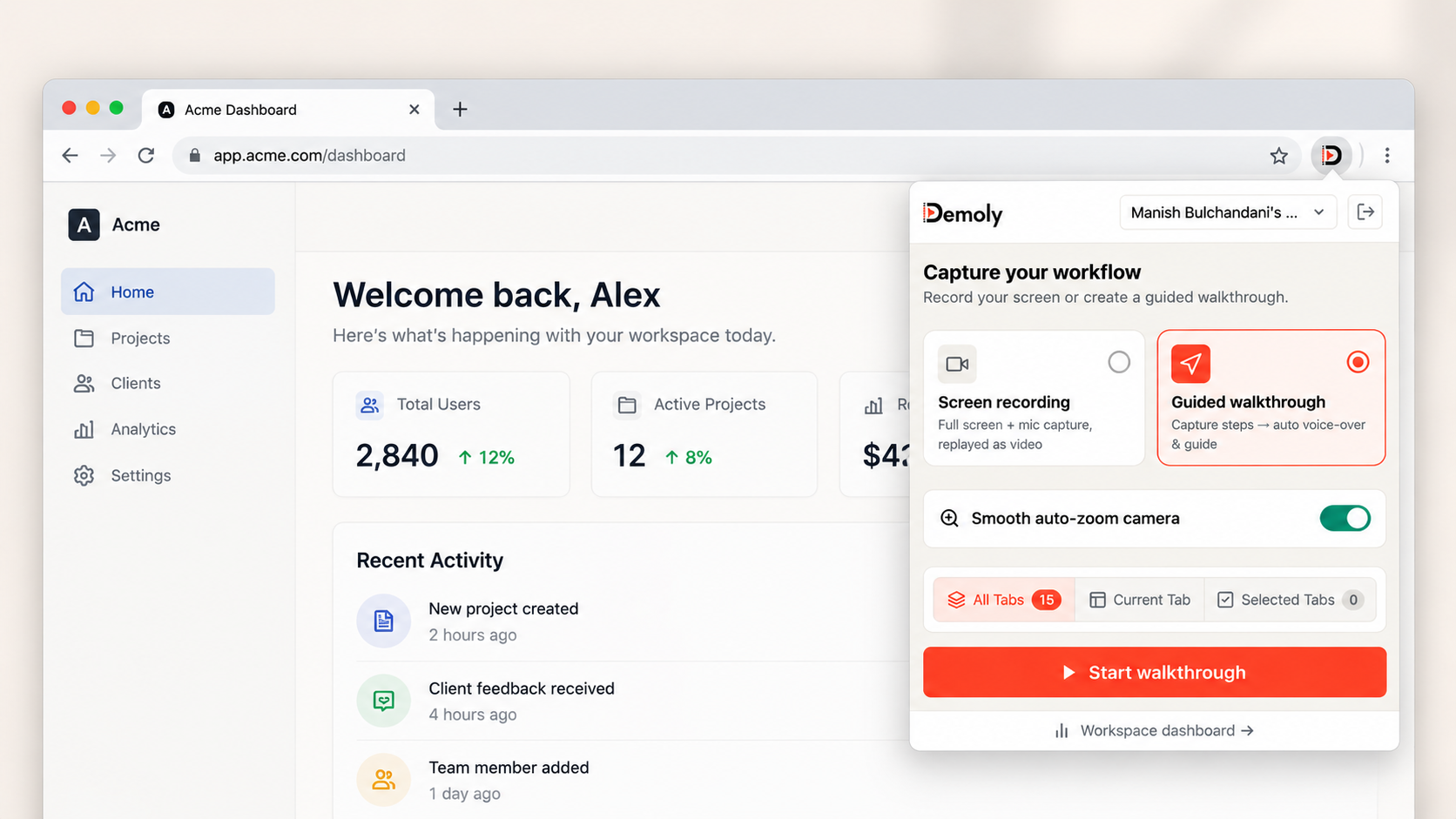
Select the relevant client project folder from the dropdown, verify your microphone input, and click Start recording. Demoly captures high-definition video across browser tabs smoothly without system lag. You can demonstrate navigating from company settings to workflow builders and integration consoles while Demoly tracks page transitions and click events automatically.
2. Sanitize Tenant Data with Canvas Element Redaction
When demonstrating configuration steps inside active staging accounts, customer success managers often need to hide client emails, internal notes, or proprietary tokens.
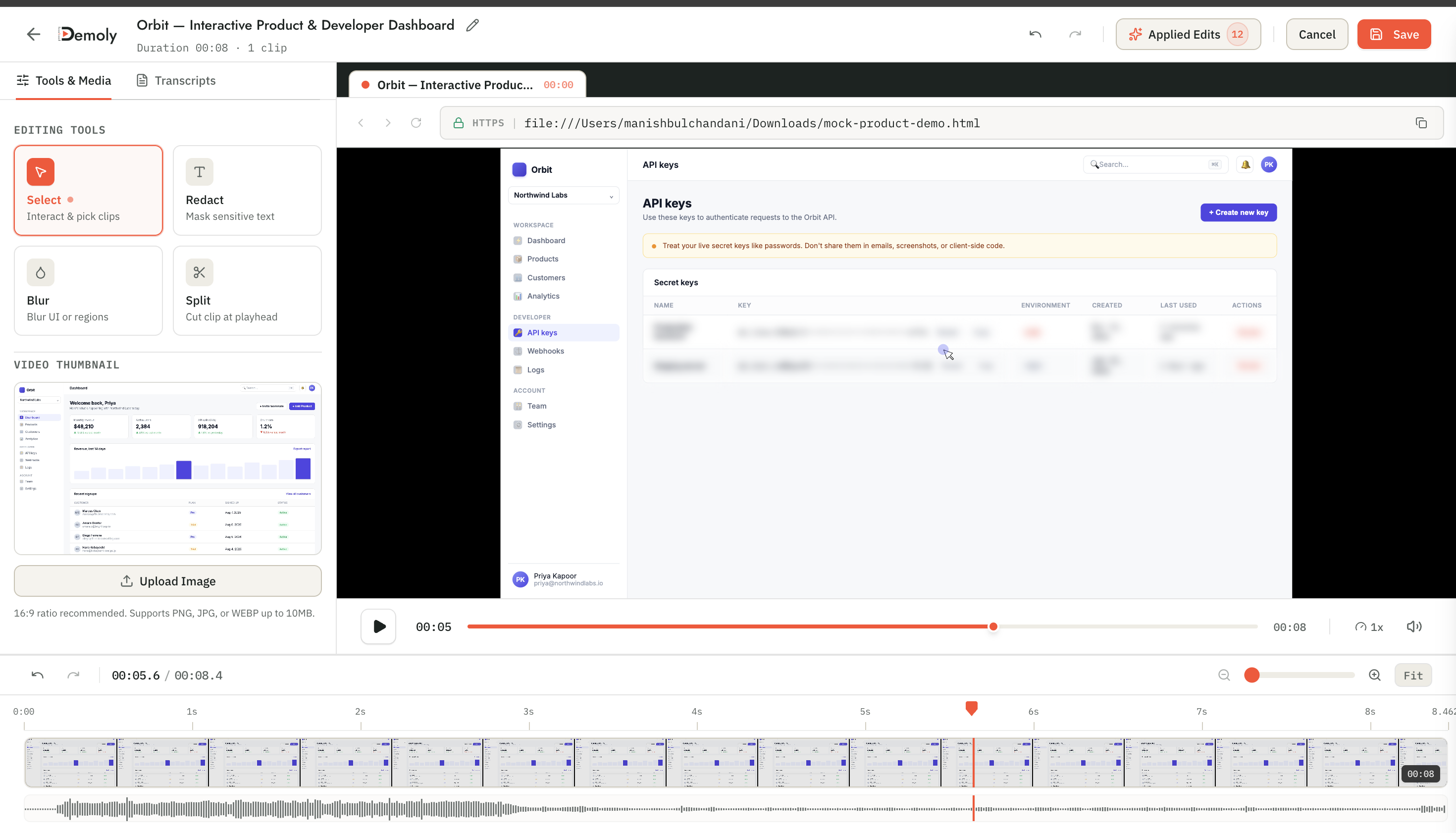
Open the recording in Demoly's in-browser editor and apply canvas element blur overlays directly across sensitive data. Because Demoly burns redaction masks into the video canvas, sensitive data cannot be uncovered by viewers or inspect-element tools.
3. Enable Natural-Language AI Search for Instant Answers
Once your onboarding modules are recorded, Demoly processes the visual clicks, DOM elements, and spoken audio into a unified semantic index.
When client team members watch a module, they can open the Ask Demoly AI drawer at any point to ask specific procedural questions. Instead of waiting hours for a CSM email reply, the client receives an instant answer with a clickable timestamp chip that navigates directly to the relevant interface action.
4. Distribute Zero-Friction Links Without Client Login Walls
When your role-based curriculum is ready, generate an onboarding link directly from the Demoly dashboard.
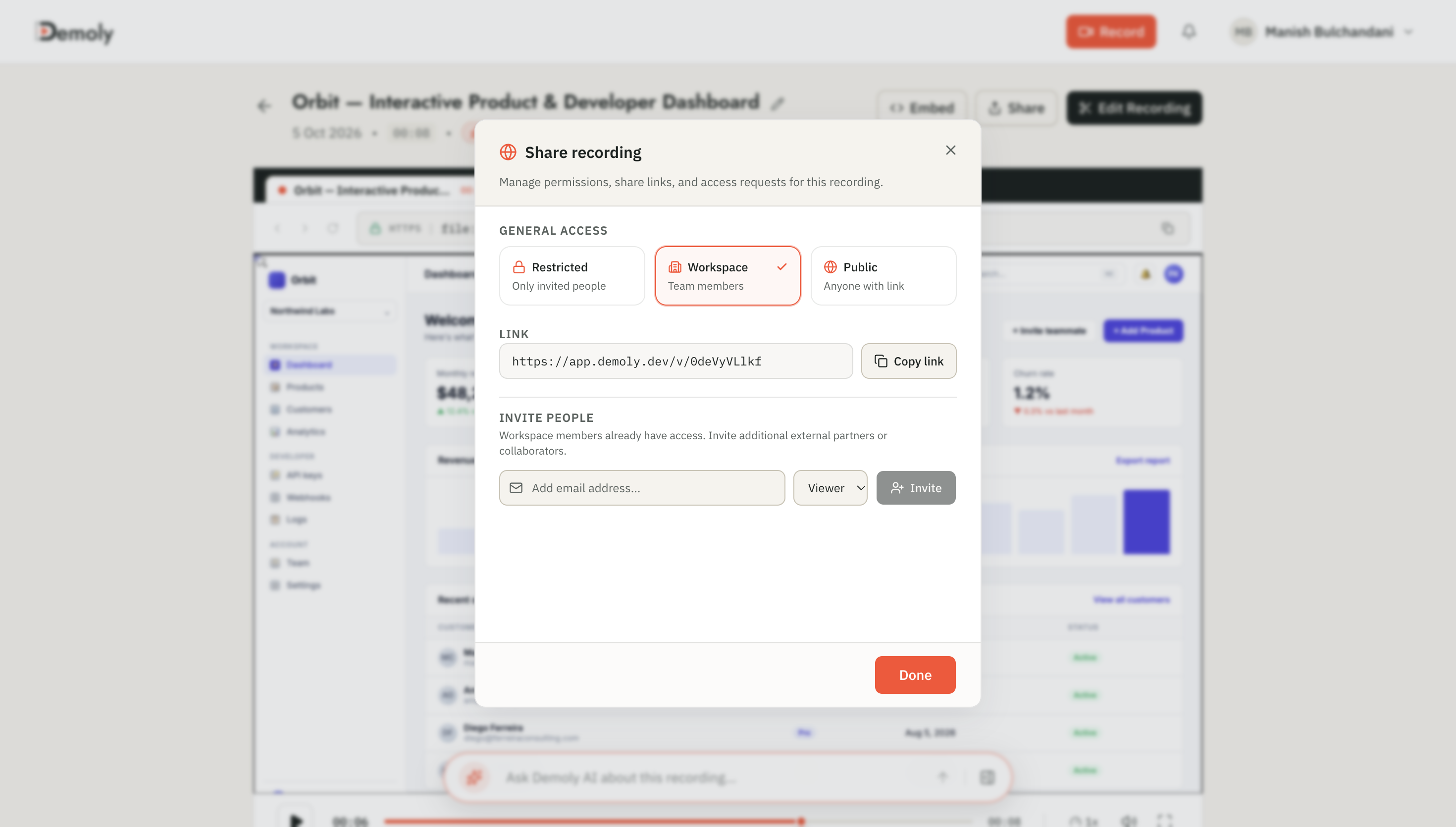
Open the share dialog, configure viewer permissions, and copy the clean public URL. Client stakeholders can review onboarding videos in any standard web browser on desktop or mobile without downloading software, installing extensions, or signing up for paid user accounts.
By replacing repetitive introductory calls with modular, AI-searchable walkthroughs, customer success teams compress time-to-value, eliminate tier-1 ticket volume, and scale client onboarding sustainably.
Frequently asked questions
Commonly asked questions about this article.
01•Do client stakeholders need a Demoly account or license to watch onboarding walkthroughs?
No. Demoly share links open directly in any modern web browser without requiring client team members to sign up, download software, or consume paid workspace seats.
02•How do clients search for specific onboarding steps inside a video without scrubbing?
Clients open the Ask Demoly AI drawer and type questions in plain English. The AI indexes spoken voice and on-screen clicks, returning instant answers with clickable timestamp chips.
03•Can CSMs update a single onboarding module without re-recording the entire sequence?
Yes. Because Demoly organizes onboarding into modular 3-to-5 minute topic recordings, CSMs can easily re-record or edit an individual feature clip without touching the rest of the curriculum.
04•How does Demoly prevent client PII or sensitive staging credentials from leaking?
Demoly provides in-browser canvas element masking that applies permanent blur overlays over sensitive text, customer emails, API keys, and billing details before share links are generated.
05•Does an asynchronous onboarding workflow completely eliminate live CSM meetings?
No. Asynchronous walkthroughs handle repetitive interface training and configuration, freeing CSMs to spend live client meetings on high-value strategic goals, executive alignment, and expansion planning.
Demoly Team
Contributor
Related Dispatches
View all dispatches →
How Tech Leads Hand Off a Codebase Walkthrough to a New Engineer
Live repo tours drain senior engineering hours and leave new hires struggling with undocumented runtime dependencies. Discover how tech leads hand off codebases asynchronously using modular, AI-searchable walkthroughs.
How Agency Founders Cut Post-Launch Client Support Hours
Unbilled post-launch client questions quietly erode project profit margins and pull senior engineers out of billable sprints. Discover how agency founders eliminate post-delivery support hours using structured handovers and searchable visual walkthroughs.
Scribe vs Tango vs Demoly: Which Tool Fits Your Workflow?
Compare Scribe, Tango, and Demoly. Discover how static step-by-step guides, interactive browser guidance, and AI-searchable video walkthroughs compare across team workflows.
Try Demoly for your team
Create branchable, interactive demo recordings and deliverables in minutes with zero friction.